How to make AI videos for YouTube: no camera needed
You make AI videos for YouTube in six steps: pick an idea, write a script, make a voice, make the visuals, edit it all together, then upload it. You do not need a camera, because AI tools can make the pictures, the clips and the voice from text. Many tools have a free plan to try, but the free plans are small.
YouTube also has rules about labeling realistic AI video and about which channels can earn money.
This post checks the tools' own pricing pages and YouTube's own help pages as of November 2026. Where a page is quiet on something, this post says so instead of guessing.
How do you make AI videos for YouTube?
You use one AI tool for each job: words, voice, pictures and editing. The six steps are below.
- Pick one idea. One video, one question, one audience. "How does a solar panel work, for beginners" is better than "all about energy."
- Write the script. Use a chat tool like ChatGPT or Claude. Ask for short sentences and a strong first line.
- Make the voice. Use a text-to-speech tool, or a clone of your own voice.
- Make the visuals. Use a video tool to turn each line of the script into a clip or an image.
- Edit. Put the clips, voice, captions and music on one timeline.
- Upload. Add a title, a thumbnail and, if your video looks real, the AI label.
Most of your time goes into steps two and five. The tools make the clips fast. You still decide what to say and what to keep.
What kinds of AI videos can you make for YouTube?
You can make four common kinds without ever filming yourself.
- Voiceover over AI clips. The script is read by an AI voice while AI-made clips or images play.
- Talking presenter. An AI avatar looks at the camera and reads your script.
- Animated explainers. Text, charts and simple motion, built from code. Make videos with Claude shows how.
- Faceless videos. Any video where you never show your face. Read how to make faceless AI videos for that path.
Pick the kind that fits your topic. A history video can run on AI pictures with a voiceover. A how-to video may work better as a presenter or a screen recording.
What tools do you need to make AI videos for YouTube?
You need a script tool, a voice tool, a visual tool and an editor. One tool can cover two jobs, but most people use three or four. Here is what each tool's own page says today.
| Job | Tool | What its page says (checked November 2026) |
|---|---|---|
| Script | ChatGPT, Claude | Chat tools for ideas, hooks and scripts. See the ChatGPT post for what it can and cannot do. |
| Visuals | Higgsfield (affiliate link) | Has a Free plan with "limited use." Paid plans list Seedance 2.5 video. A 5 second Seedance 2.5 clip costs 35 credits at 720p and 80 credits at 1080p. |
| Visuals | CapCut AI video generator | Starts from a script or a reference image, runs on Seedance 2.5, and has a 7-day free trial. |
| Visuals | Runway | Free plan: 125 one-time credits. Standard plan: $15 a month, or $12 a month billed yearly. |
| Visuals | Gemini | Gemini Omni makes and edits video, and it needs a Google AI subscription. It replaces Veo in the Gemini app. |
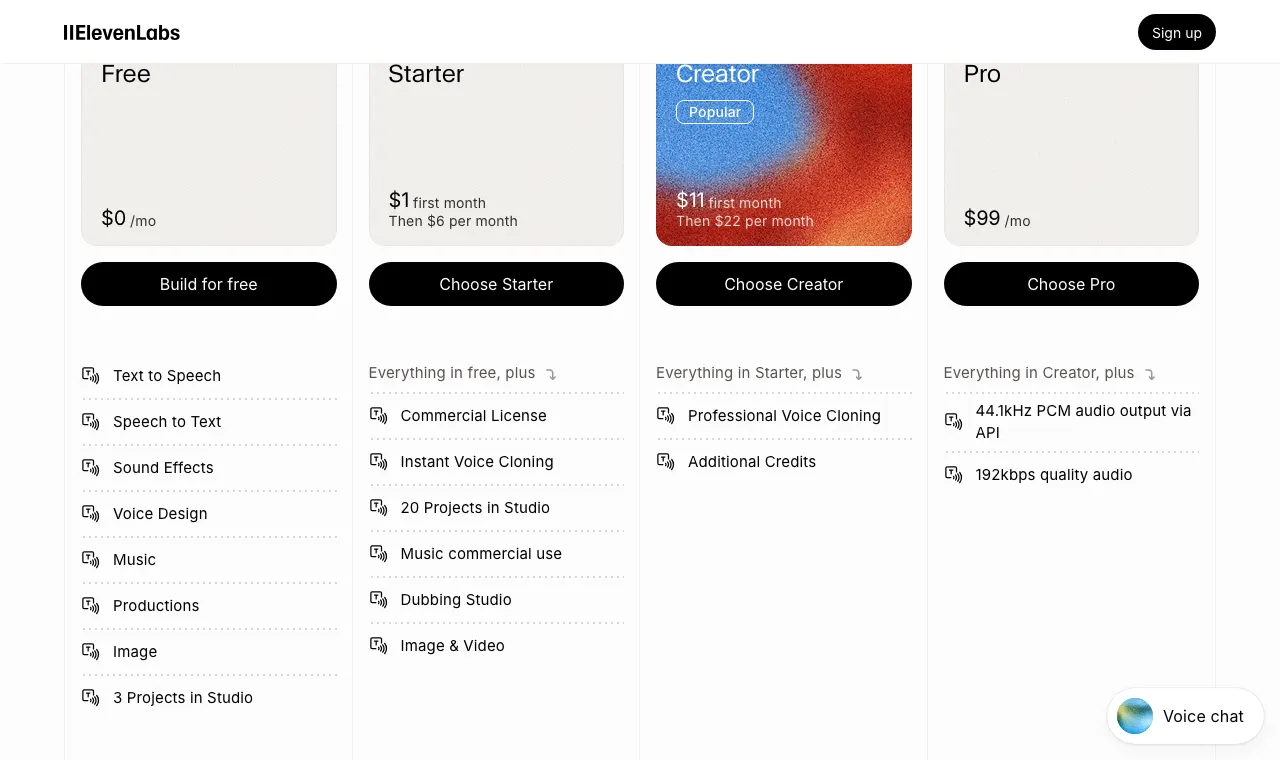
| Voice | ElevenLabs (affiliate link) | Free plan: $0 and 10,000 credits a month. Starter lists a commercial license. |
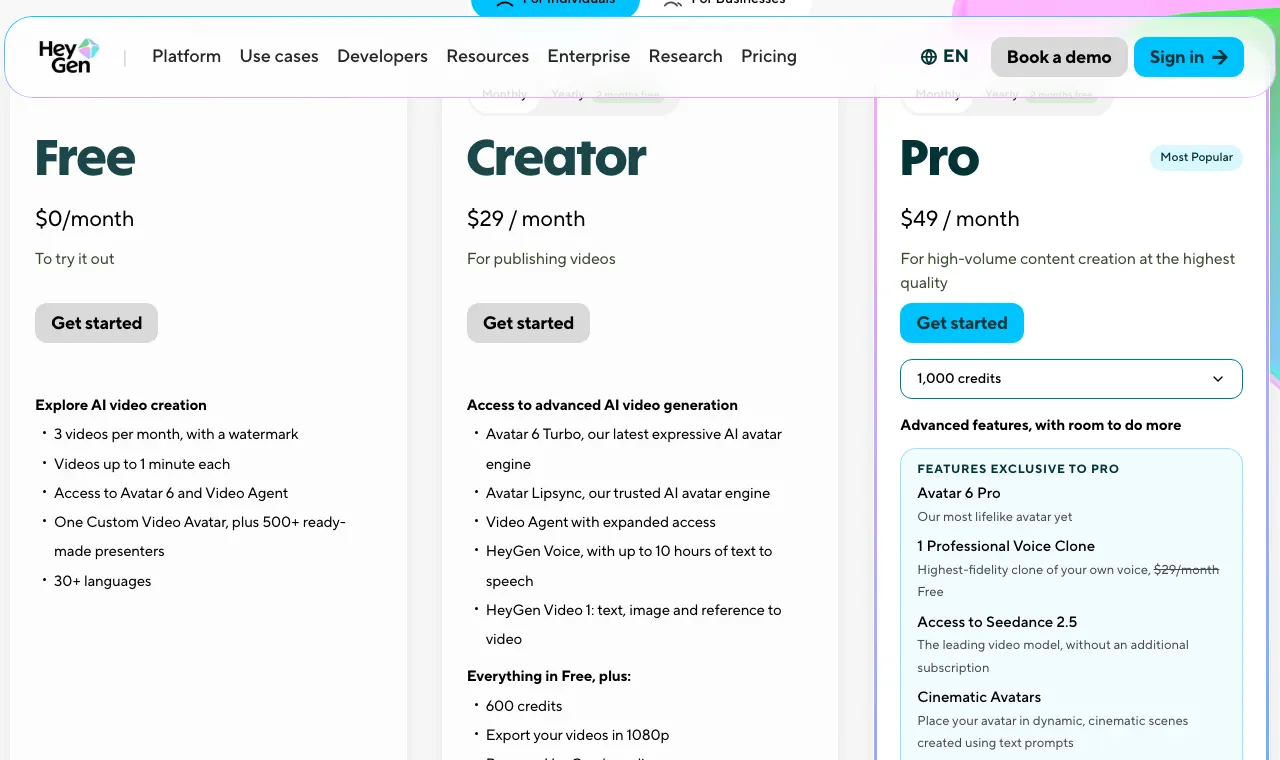
| Presenter | HeyGen | Free plan: 3 videos a month, with a watermark. Creator plan: $29 a month, removes the HeyGen branding. |
| Editing | CapCut | A video editor with an AI video maker built in. |
Affiliate link: I may earn a commission if you sign up through the links marked affiliate. It costs you nothing extra.
One tool, CapCut, shows up twice because it does both jobs. You do not need every tool in the table. A simple setup is a chat tool, one voice tool and one video tool.
Can you make AI videos for YouTube for free?
You can start for free, but free plans cap how much you can make. Treat free plans as a way to test, not to run a channel.
Here is what the free options say on their own pages:
- Runway gives 125 credits one time. Its pricing page says 625 credits on the Standard plan equals 52 seconds of Gen-4.5 video. So a short clip uses credits fast.
- HeyGen's Free plan gives 3 videos a month, up to 1 minute each, with a watermark.
- ElevenLabs gives 10,000 credits a month for $0. Its page lists a commercial license starting at the Starter plan, so check that before you post a monetized video.
- CapCut says it has a 7-day free trial for its AI video generator. It also says generation credits, export quality and features depend on your plan and region.
- Higgsfield has a Free plan with limited use. Its paid plans start at $9 a month billed yearly during its Black Friday sale.
A watermark on a video can make it look less trusted. If you plan to post on a channel you care about, plan for a paid month in at least the voice or the video tool.
Prices and sales change often, so check each pricing page the day you sign up.
How do you write the script for an AI video?
Write the script first, because every other step follows it. A script written in short, plain sentences is easier to voice and easier to turn into clips.
Here is a simple way to do it with a chat tool:
- Tell the tool your audience, your topic and how long the video should be.
- Ask for 10 first lines. Pick the one you would stop scrolling for.
- Ask for the script in short sentences, one idea per line.
- Ask for a scene list. For each line, ask for one picture or clip idea.
- Read the script out loud. If it sounds stiff, shorten it.
YouTube's own page says you do not need to disclose AI help with a video outline, script, thumbnail, title or infographic. It also lists idea generation and caption creation as minor help that needs no label. So a chat tool is the safest place to start.
How do you make the visuals and the voice?
Make the voice first, then build clips to match it. The voice sets the length of the video, so the clips have a clear target.
For the voice:
1. Paste the script into a text-to-speech tool and pick a voice. 2. Listen to the whole thing. Fix any word it says wrong by changing the spelling in the script. 3. Download the audio file.
You can also clone your own voice. YouTube's page lists "cloning one's own voice to create voice overs or dubs" as something creators do not need to disclose. A voice clone should be your own voice, not someone else's.
For the visuals:
1. Use the scene list from your script. Make one clip or image for each line or two. 2. Keep each clip short. Short clips cost fewer credits and are easier to fix if one comes out wrong. 3. Make a few versions of any clip that matters, and keep the best one. 4. Look closely at faces, hands and any text in the picture. Redo any clip where they look wrong.
If you want a presenter on screen, a tool like HeyGen reads your script with an AI avatar. HeyGen's Free plan lists one custom video avatar plus 500 or more ready-made presenters.
Every tool has its own rules for what you can post. Read each tool's terms before you use its output on a channel that earns money.
How do you edit an AI video?
Put everything on one timeline, then trim until it moves. This is where a pile of clips becomes a video people watch to the end.
- Lay the voice track down first.
- Drop each clip under the line it matches.
- Cut any clip that runs longer than the line.
- Add captions, so the words show on screen too.
- Add soft music under the voice, quiet enough that you can still hear every word.
- Watch it once from start to end, then fix the three things that bother you most.
CapCut works as an editor and has an AI video maker inside it. If you start with a long video you already have, how AI video clipping works shows how tools cut it into short clips.
Do you have to tell YouTube a video is AI?
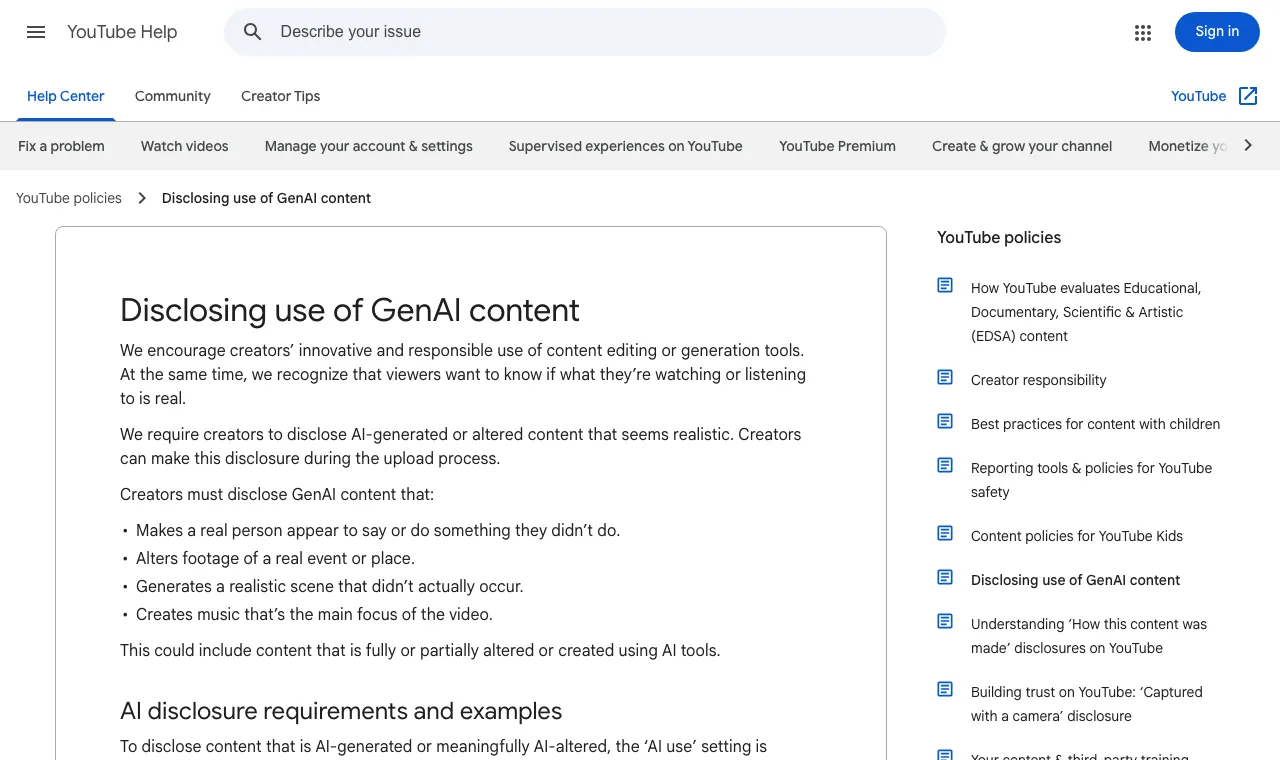
Yes, if the video looks real and shows something that did not happen. YouTube asks creators to disclose AI-made or AI-changed content that seems realistic. You do it in YouTube Studio during upload, in the Attributes section, under "AI use."
YouTube's help page says you must disclose AI content that:
- Makes a real person appear to say or do something they did not do.
- Alters footage of a real event or place.
- Generates a realistic scene that did not happen.
- Creates music that is the main focus of the video.
You do not need to label things that are not realistic, such as someone riding a unicorn in a fantasy world, or an animated video. Minor edits like color changes, captions and audio repair also need no label.
Two more points from the same page. First, it says that disclosing AI content alone will not limit a video's audience or its eligibility to earn money. Second, YouTube may add a label on its own if a video uses YouTube's AI tools, carries C2PA metadata, or its systems detect AI. It also says creators who keep choosing not to disclose may face a label added by YouTube, or penalties such as removed content or suspension from the YouTube Partner Program.
So when in doubt, say yes. A label costs you nothing, and skipping one can.
Can AI videos make money on YouTube?
They can, if the channel meets the YouTube Partner Program rules and the videos are original and useful. Nobody can promise what a channel will earn, and results vary.
Here is what YouTube's own pages say. To apply for the YouTube Partner Program, a channel needs one of these:
1. 1,000 subscribers and 4,000 qualified public watch hours in the last 12 months. 2. 1,000 subscribers and 10 million qualified Shorts views in the last 90 days.
Then YouTube reviews the channel. Its monetization policy says content must be original and "authentic," and not mass-produced, generic, repetitive or made only to get views. The policy lists "AI-generated content made with generic or unoriginal templates giving the impression of mass production" as content that is not allowed to monetize. It also says the same intro and outro are fine, as long as the bulk of each video is different.
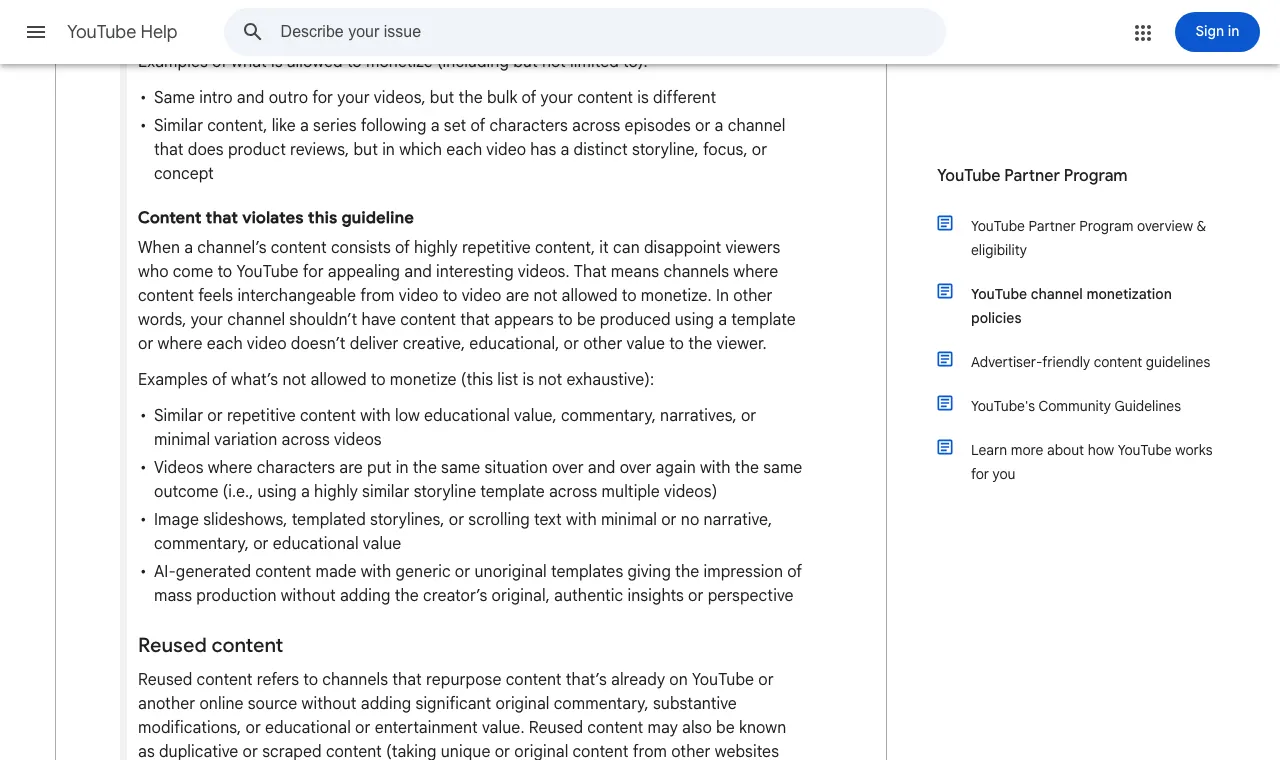
If each video says something new, in your own words and ideas, then AI is just a tool. If you push out the same template again and again with little new in it, the channel may not be eligible to earn.
For the money side, read how faceless channels make money. There are also creator payout programs outside YouTube ads, explained in what Content Rewards is.
What mistakes should you avoid?
The most common mistakes are about skipping steps, not about the tools. Avoid these.
- Posting the first draft. Always watch the whole video before you upload.
- Using one template for every video. YouTube's policy names this as a risk.
- Showing a real person doing something they never did. That needs a label, and it can hurt real people.
- Skipping the AI label on realistic scenes. YouTube says repeated non-disclosure can lead to penalties.
- Ignoring the tool's terms. Check if you can use the output on a channel that earns money.
- Making a long video with a tiny credit plan. Do the math on credits before you start. A minute of video can need a lot of clips.
Where can I learn the whole process?
If you want to see the whole process from idea to posted video, watch the free training. Othman Tmoulik teaches it, and it covers how to make viral AI videos without showing your face. You need no tech background.
If you are curious about the money side, the earnings calculator lets you enter your own rates. Results vary, and nobody can promise what you will earn.
Sources
- Disclosing use of GenAI content, YouTube Help (checked November 2026)
- YouTube channel monetization policies, YouTube Help (checked November 2026)
- YouTube Partner Program overview and eligibility, YouTube Help (checked November 2026)
- Higgsfield pricing (checked November 2026)
- CapCut free AI video generator (checked November 2026)
- Runway pricing (checked November 2026)
- Gemini Omni video generation, Google (checked November 2026)
- ElevenLabs pricing (checked November 2026)
- HeyGen pricing (checked November 2026)
FAQ
How do you make AI videos for YouTube?
Write a script with a chat tool, make a voice with a text-to-speech tool, make the clips with a video tool, edit them together, and upload. You do not need a camera. Most people use three or four tools, and many have free plans to test.
Can you make AI videos for YouTube for free?
You can start for free, but the free plans are small. Runway gives 125 one-time credits, HeyGen's Free plan adds a watermark and allows 3 videos a month, and ElevenLabs gives 10,000 credits a month. Plan on paying for at least one tool if you post often.
Do I have to label AI videos on YouTube?
Only if the video looks realistic and shows something that did not happen, such as a real person saying or doing something they did not. Animated and clearly unreal videos, scripts, captions and minor edits do not need a label. You set it in YouTube Studio under "AI use."
Can AI videos be monetized on YouTube?
Yes, if the channel joins the YouTube Partner Program and follows its rules. YouTube says the content must be original and not mass-produced. It lists AI content made with generic templates as not allowed to monetize. Earnings vary and are never promised.
Do I need to show my face to make YouTube videos with AI?
No. You can use AI voiceovers, AI clips, an AI avatar or animated graphics. If you use an avatar of a real person, check the label rules above and the tool's terms.
Which AI video tool should I start with?
Start with the job you are stuck on. If you have no script, use a chat tool. If you have a script but no clips, try a video tool's free plan. Compare a few in the table above before you pay for any of them.
Get the free training first
It's coming soon. Join the waitlist and you'll hear first.
No spam. Unsubscribe anytime.
Keep reading
Affiliate disclosure: some links in articles may be affiliate links. If you buy through one, Freed by AI may earn a commission. That does not change the price you pay.