Can you make AI videos with ChatGPT? What works in 2026
Yes, you can make AI videos inside ChatGPT, but not with ChatGPT alone. OpenAI shut down its Sora video tool on April 26, 2026, and no ChatGPT plan lists video generation now. To make video in the chat, you add a video plugin such as Higgsfield (affiliate link), which is listed in OpenAI's own plugin directory. ChatGPT itself is still very good at the writing side of video: ideas, hooks, scripts, captions and titles.
This post checks OpenAI's own pages as of November 2026. Where the pages are quiet on something, this post says so instead of guessing.
Can you make AI videos with ChatGPT?
Not from ChatGPT by itself. You need a video plugin, covered below. OpenAI's Sora page now says that as of April 26, 2026, the Sora product is no longer available.
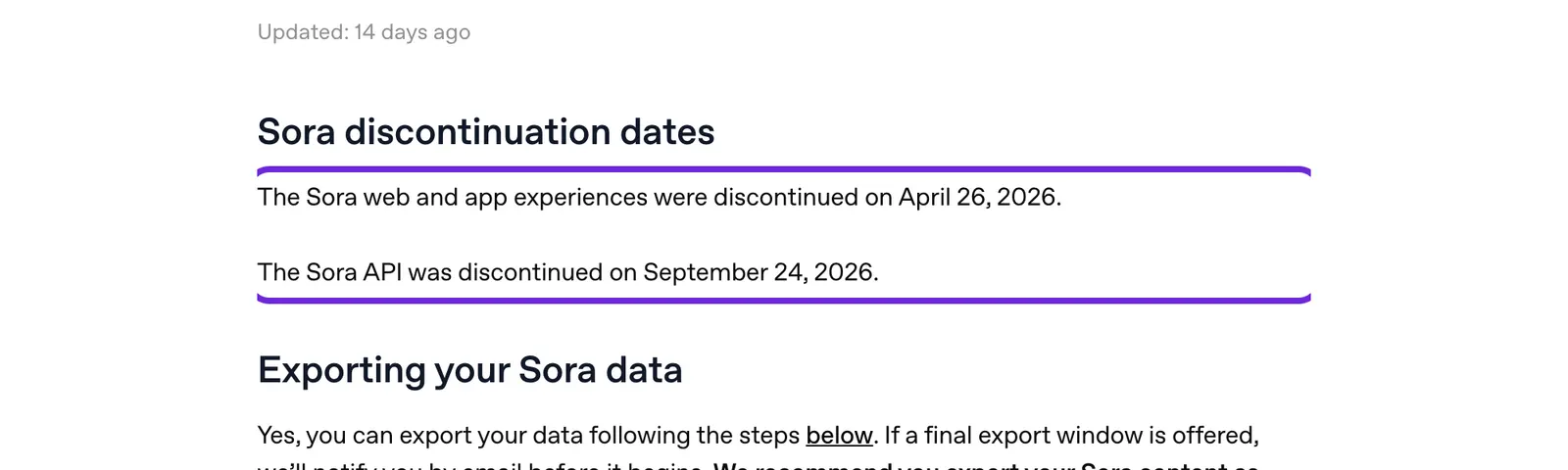
OpenAI's help center confirms the dates. The Sora web and app experiences were discontinued on April 26, 2026. The Sora API was discontinued on September 24, 2026.
OpenAI did not say that ChatGPT will never make video. OpenAI's pages just do not list video generation as a feature of any ChatGPT plan. If that changes, the pricing page is the place to check.
What happened to Sora?
Sora was OpenAI's text-to-video tool. It was shut down in 2026, in the app and in the API.
OpenAI told CBS News it decided to discontinue Sora in the consumer app and API. It said it was putting its computing power toward the highest-value uses. The Sora research team moved to world simulation research.
If you made videos in Sora, OpenAI's help center says you can export them at sora.chatgpt.com/sunset. It also says OpenAI will permanently delete data tied to Sora after the export period. Export early.
Can you make AI videos with ChatGPT for free?
On the Free plan, you can use ChatGPT for text and limited image creation. You cannot make AI videos with it.
OpenAI's pricing page lists these Free plan items: unlimited text chats with GPT-6, limited image creation, limited voice chats, and limited deep research. Video generation is not on the list.
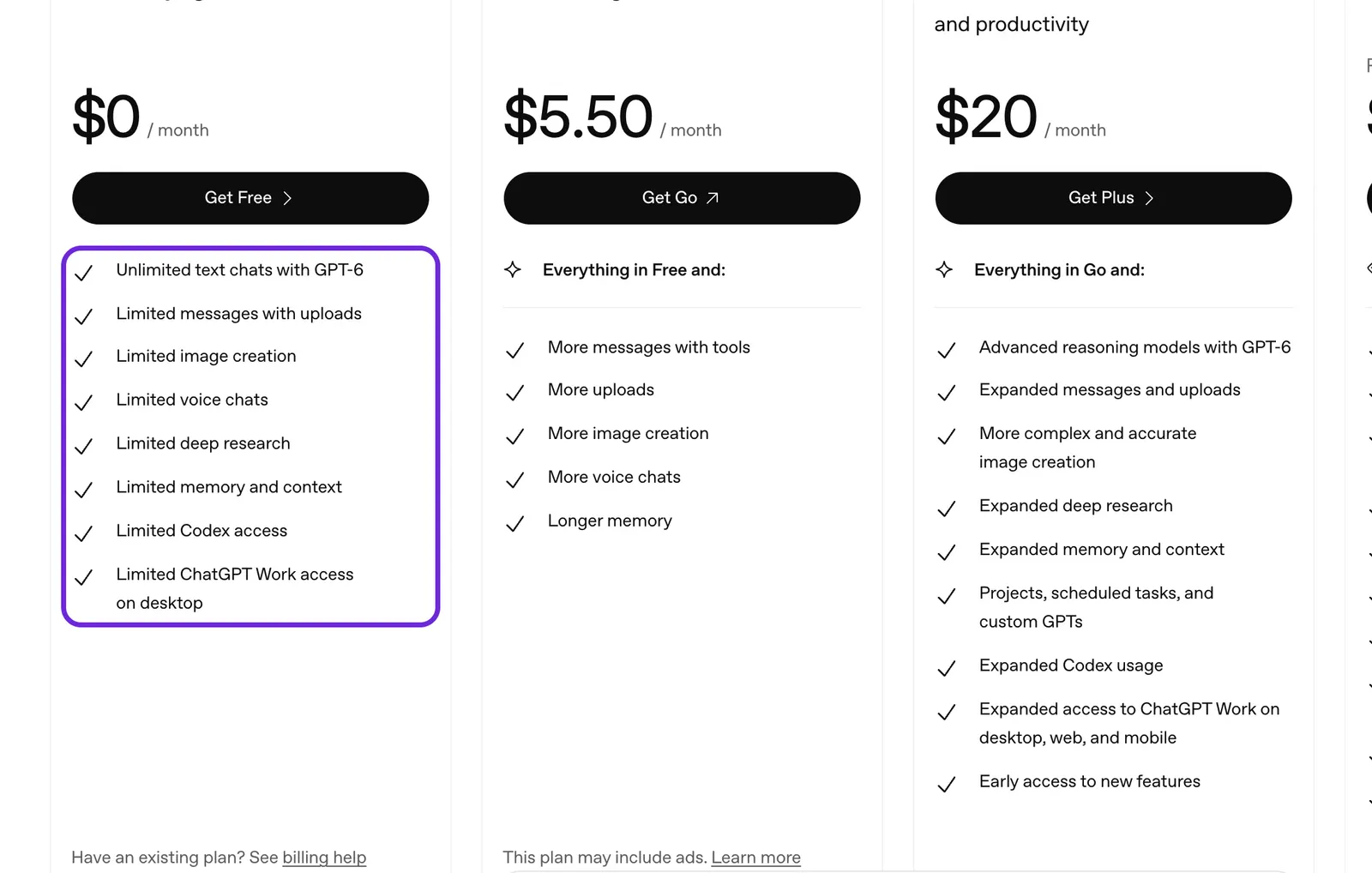
So "free" gets you the writing help. That is the part most video makers use every day anyway.
Can you make AI videos with ChatGPT Plus, Pro or Go?
No paid ChatGPT plan lists video generation on OpenAI's pricing page. The paid plans give you more of the other things.
- Go: More image creation, more uploads, more voice chats, and longer memory than Free. OpenAI says this plan may include ads. It also lists "voice with video," which is a voice chat feature, not video generation.
- Plus: Everything in Go, plus more complex and accurate image creation and expanded deep research. OpenAI's help center lists Plus at $20 a month.
- Pro: Everything in Plus, with unlimited and faster image creation, which OpenAI says is subject to abuse guardrails. OpenAI's help center lists three Pro tiers at $100, $200 and $500 a month.
OpenAI's pricing page shows no video length limit for any plan, because it shows no video feature. Older articles about Sora limits on Plus and Pro are out of date.
Is there any way to create AI videos from inside ChatGPT?
Yes, through a plugin from another company. These are not made by OpenAI, and quality and cost depend on the maker.
The best known is Higgsfield (affiliate link). OpenAI's plugin directory lists it under Design and Creative as "Every image and video model," made by Higgsfield AI, Inc. The listing says you can create images, videos and product ads in ChatGPT, starting from an idea, a product photo or reference media. You add it from the ChatGPT plugin directory and sign in with a Higgsfield account. Affiliate link: I may earn a commission if you sign up through it.
OpenAI's own plugin directory also lists one called AI Video Maker, built by a company named InfoseekAI. The page says it uses the Seedance 2 and 2.5 video models, needs no subscription, and charges usage-based prices that depend on video resolution and length. We have not tested it. Treat it as one option to check, not a recommendation.
You can also skip plugins. Many people write the script in ChatGPT, then use a separate video tool to turn it into a clip. The steps below show that path.
What is ChatGPT great for in video?
ChatGPT is a writing partner. It can give you a lot of the raw material for a video in minutes.
- Ideas: Ask for 20 video topics for one audience, then pick the best three.
- Hooks: Ask for ten ways to open the first line of a short video.
- Scripts: Ask for a 30 to 45 second script in short, plain sentences.
- Captions and titles: Ask for five caption options and five title options for each video.
- Image prompts: Ask for scene descriptions you can paste into an image or video tool.
- Images: Plus, Pro and the other plans can create images, with more of them on higher plans.
Read every script out loud before you use it. If it sounds stiff, shorten it.
What is a simple workflow to make an AI video with ChatGPT?
You use ChatGPT for the words and a video tool for the picture and sound. Here is a plain version.
- Pick one topic and one audience. Write them in one sentence.
- Ask ChatGPT for ten hooks. Choose the one you would stop scrolling for.
- Ask for a 30 to 45 second script that starts with that hook. Ask for short sentences and simple words.
- Ask ChatGPT for one image or scene idea for each line of the script.
- Make the visuals and a voiceover in a video tool. Many people use a text-to-video tool or an image-to-video tool for this step.
- Add captions, check the sound, and trim any pause that feels long.
- Ask ChatGPT for a caption and a title that match the video.
- Post it, then look at which hooks got watched and which did not.
If you do not want to be on camera, this is called making a faceless video. Read how to make faceless AI videos for that path. If you want to compare ChatGPT with another writing tool, read how to make videos with Claude.
Where can I learn the whole process?
If you want to see the whole process from idea to posted video, watch the free training. Othman Tmoulik teaches it, and it covers how to make viral AI videos without showing your face, using ChatGPT or Claude. You need no tech background.
If you are curious about the money side, the earnings calculator lets you enter your own rates. Results vary, and nobody can promise what you will earn.
Sources
- What to know about the Sora discontinuation, OpenAI Help Center (checked November 2026)
- Sora: Creating video from text, OpenAI (checked November 2026)
- ChatGPT pricing, OpenAI (checked November 2026)
- What is ChatGPT Go, OpenAI Help Center (checked November 2026)
- What is ChatGPT Plus, OpenAI Help Center (checked November 2026)
- About ChatGPT Pro tiers, OpenAI Help Center (checked November 2026)
- Higgsfield plugin for ChatGPT, OpenAI (checked November 2026)
- Higgsfield: generate images and videos in ChatGPT (checked November 2026)
- AI Video Maker plugin for ChatGPT, OpenAI (checked November 2026)
- OpenAI pulls the plug on its Sora AI video app, CBS News (checked November 2026)
FAQ
Can you make AI videos with ChatGPT?
Yes, with a plugin. ChatGPT alone cannot, because OpenAI shut down Sora on April 26, 2026, and no plan lists video generation. Add a video plugin such as Higgsfield from the ChatGPT plugin directory to make videos in the chat. ChatGPT can still write your hooks, scripts, captions and titles, and it can create images.
Can you make AI videos with ChatGPT for free?
No. The Free plan gives you text chats and limited image creation. For video, you would need a separate tool, and that tool sets its own price.
Can you make AI videos with ChatGPT Plus?
OpenAI's pages do not list video generation for Plus. Plus is $20 a month, per OpenAI's help center, and adds things like more complex image creation and expanded deep research. Older articles about Sora on Plus no longer apply.
Can you make AI videos with ChatGPT Pro?
OpenAI's pages do not list video generation for Pro either. Pro lists unlimited and faster image creation, bigger usage limits, and the Pro reasoning models. The help center lists Pro tiers at $100, $200 and $500 a month.
Can you make AI videos with ChatGPT Go?
OpenAI's pages do not list video generation for Go. Go adds more image creation, uploads and voice chats than Free, and it may include ads. Go lists "voice with video," but that is a voice chat feature.
Is Sora still available?
No. OpenAI says the Sora web and app experiences ended on April 26, 2026, and the Sora API ended on September 24, 2026. You can export your old Sora videos from OpenAI's export page while it is open.
Get the free training first
It's coming soon. Join the waitlist and you'll hear first.
No spam. Unsubscribe anytime.
Keep reading
Affiliate disclosure: some links in articles may be affiliate links. If you buy through one, Freed by AI may earn a commission. That does not change the price you pay.